Intelligent document processing IDP has fundamentally transformed how modern enterprises capture, interpret, and act upon critical business information. In an era where data volume grows exponentially every second, relying on manual data entry or legacy optical character recognition (OCR) systems is no longer a viable strategy for maintaining operational efficiency. Today, forward-thinking organizations are leveraging advanced machine learning, computer vision, and natural language processing to automate complex document workflows. If you are an IT leader, operations manager, or business executive looking to understand how to deploy intelligent document processing IDP effectively, you are in the right place.
This comprehensive guide demystifies the landscape of modern data capture. We will explore the critical IDP vs OCR difference, detail the mechanics of the intelligent document processing workflow, and provide a strategic roadmap for navigating IDP platform selection criteria. By the end of this article, you will have a clear, actionable blueprint for calculating your IDP ROI and ensuring strict IDP compliance and audit trail adherence and positioning your organization at the forefront of the intelligent automation revolution.
1. The Evolution of Data Capture: Intelligent Document Processing IDP vs. OCR: Difference Explained
To truly capitalize on enterprise automation, we must first address the fundamental IDP vs OCR difference. Traditional OCR is a foundational, rule-based technology that simply converts scanned images of text into machine-readable characters. It is rigid, struggles immensely with variations in formatting, handwriting, or poor scan quality, and lacks any contextual understanding of the data it extracts.
In contrast, intelligent document processing IDP represents a quantum leap forward. It combines OCR with advanced artificial intelligence, machine learning (ML), and natural language processing (NLP). While traditional OCR asks, “What characters are in this image?” the paradigm of document understanding AI vs traditional OCR shifts the question to, “What does this document mean, and what action should be taken?” Intelligent document processing IDP can comprehend context, extract relationships between disparate data points, and classify documents automatically, making it a dynamic, cognitive solution rather than a static digitization tool.
2. Core Components of the Intelligent Document Processing Workflow
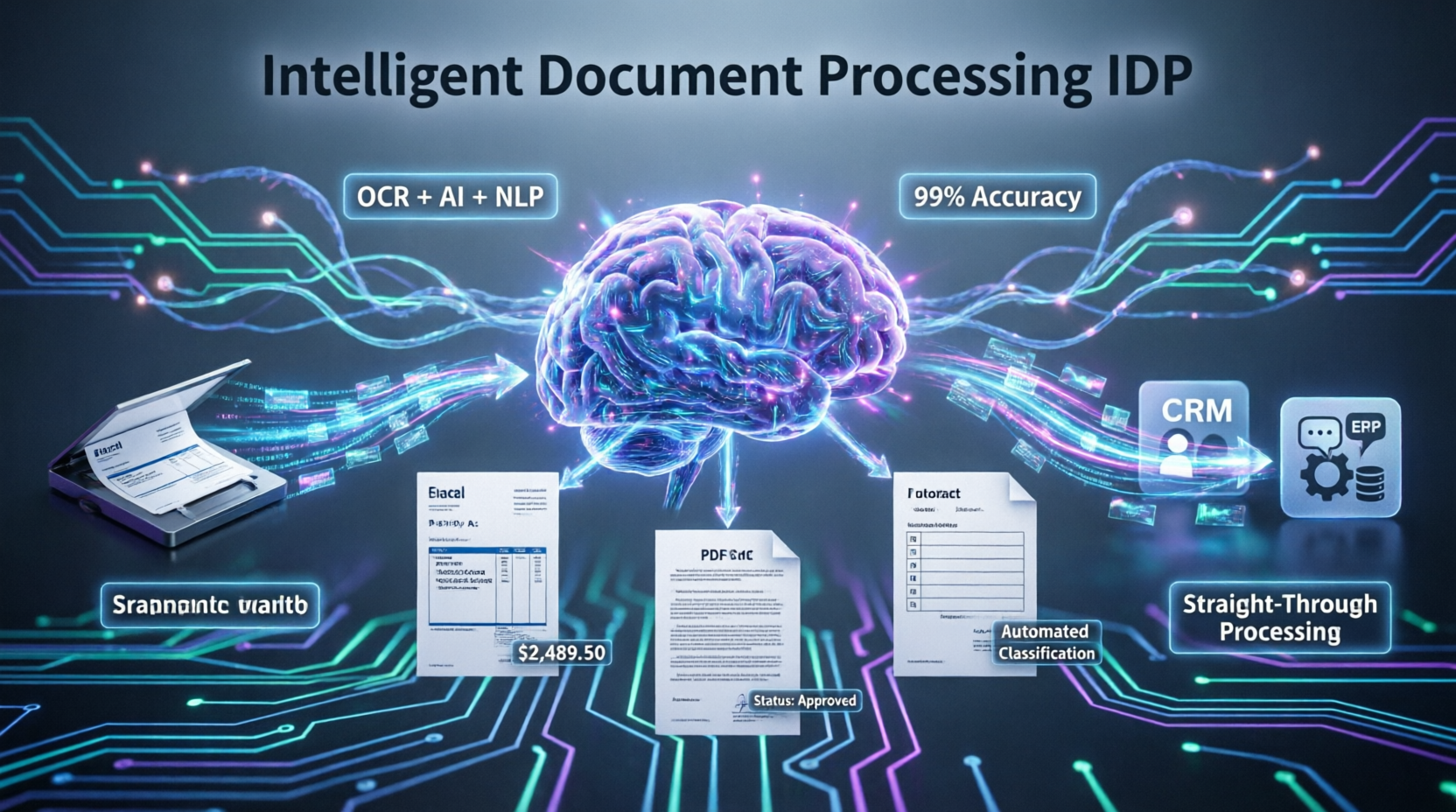
A robust intelligent document processing workflow is designed to handle the entire lifecycle of a document, from ingestion to actionable output, with minimal human intervention. Understanding this workflow is critical for mapping automation to your specific business processes.
Key Stages of the Workflow:
- Document Ingestion: Capturing documents from multiple channels (email, scanners, APIs, cloud storage) in various formats (PDF, JPEG, Word, scanned images).
- IDP Document Classification Automation: Using machine learning to automatically identify the document type (e.g., invoice, contract, medical record, tax form) regardless of layout variations or missing templates.
- Data Extraction: Leveraging IDP natural language understanding and computer vision to pull specific, relevant data points from both structured forms and complex IDP unstructured data processing scenarios (like free-text emails or multi-page legal agreements).
- Validation and Human-in-the-Loop (HITL): Cross-referencing extracted data against existing enterprise systems (like an ERP or CRM) and routing low-confidence extractions to human reviewers for quick, intuitive verification.
- Export and Integration: Pushing the validated, structured data into downstream business applications to trigger automated workflows and update records seamlessly.
3. IDP Software Features Enterprise Leaders Demand in 2026
As the technology matures, the baseline expectations for enterprise-grade platforms have risen significantly. Modern IDP software features enterprise solutions offer are built around scalability, security, and adaptability.
- Pre-trained and Custom Models: Leading platforms provide out-of-the-box models trained on millions of documents for common use cases, alongside the ability to train custom models for proprietary or highly specialized document types.
- Scalable Cloud Architecture: To handle sudden spikes in document volume, robust systems offer elastic scaling, ensuring consistent performance during peak business periods.
- Advanced Analytics Dashboards: Real-time visibility into processing volumes, accuracy rates, and bottleneck identification allows operations teams to continuously optimize the workflow.
- Seamless API Ecosystem: Out-of-the-box connectors for major enterprise software (SAP, Salesforce, Oracle, Microsoft Dynamics) ensure that extracted data flows directly into existing business systems without custom coding.
4. Maximizing IDP Data Extraction Accuracy Rates and Continuous Learning
One of the primary concerns for enterprises adopting new technology is reliability. Achieving and maintaining high IDP data extraction accuracy rates is not a one-time setup; it is an ongoing process powered by machine learning.
How Accuracy is Achieved:
- Confidence Scoring: The system assigns a confidence score to every extracted data point. High-confidence data is processed automatically (straight-through processing), while low-confidence data is routed to the HITL queue.
- IDP Machine Learning Model Training: For complex documents, enterprises can upload historical datasets to train custom models tailored to their specific layouts, terminology, and business rules.
- IDP Continuous Learning Improvement: This is the most critical feature of advanced platforms. As human reviewers correct the system’s mistakes in the HITL stage, the machine learning model absorbs these corrections. Over time, the system “learns” from its errors, continuously improving its accuracy without requiring manual reprogramming or rule updates.
5. Strategic IDP and RPA Integration Strategy for End-to-End Automation
Intelligent document processing is rarely a standalone solution; its true power is unlocked when combined with Robotic Process Automation (RPA). A well-defined IDP and RPA integration strategy creates a true end-to-end autonomous workflow.
While IDP acts as the “eyes and brain” that understand and extract meaning from the document, RPA acts as the “hands” that execute the subsequent tasks. For example, IDP extracts the vendor details, invoice number, and total amount from a PDF invoice. The RPA bot then takes that structured data, logs into the accounting software, creates the vendor record if it doesn’t exist, matches the invoice to the purchase order, and schedules the payment. This synergy eliminates manual data entry entirely, drastically reducing processing time and human error.
6. Navigating IDP Platform Selection Criteria and Vendor Comparison 2026
Choosing the right technology partner is a make-or-break decision that impacts long-term operational success. When conducting an IDP vendor comparison for 2026, decision-makers must evaluate platforms against strict IDP platform selection criteria.
Essential Selection Criteria:
- Handling of Unstructured Data: Can the platform process IDP unstructured data effectively, or does it only work with rigid, templated forms?
- Deployment Flexibility: You must evaluate IDP cloud vs. on-premises deployment options. While cloud deployments offer rapid scalability and lower upfront costs, highly regulated industries (like defense or certain financial sectors) may require on-premise or private cloud deployments to meet strict data sovereignty and security requirements.
- Total Cost of Ownership (TCO): Look beyond the initial software license fee. Consider costs related to implementation, ongoing model training, infrastructure, and vendor support.
- Vendor Viability and Support: Assess the vendor’s market presence, customer support responsiveness, and commitment to ongoing research and development.
7. IDP Implementation Best Practices, Compliance, and ROI Calculation
Deploying this technology is a strategic initiative that requires careful planning. Following IDP implementation best practices will ensure a smooth transition and rapid time-to-value.
Best Practices for Success:
- Start Small, Scale Fast: Begin with a high-volume, rule-based, and well-defined use case (like standard invoice processing) to prove the concept and build internal confidence before tackling complex, unstructured documents.
- Establish a Center of Excellence (CoE): Create a cross-functional team comprising IT, business process owners, and compliance officers to govern the automation strategy and share best practices across the organization.
- Prioritize IDP Compliance and Audit Trail: In regulated industries, every automated decision must be traceable. Ensure your chosen solution maintains a comprehensive, immutable audit trail of who reviewed a document, what changes were made, and when the data was exported, ensuring full regulatory compliance.
The IDP ROI Calculation Framework: To secure executive buy-in, you must quantify the value. A robust IDP ROI calculation framework should account for the following:
- Hard Savings: Reduction in full-time equivalent (FTE) hours spent on manual data entry, decreased error-related rework costs, and reduced physical storage needs.
- Soft Savings: Faster cycle times (e.g., quicker invoice payments leading to early-payment discounts), improved employee satisfaction by eliminating tedious work, and enhanced customer experience due to faster processing.
8. Comprehensive Query Coverage
What is the main IDP vs OCR difference explained simply? Traditional OCR simply reads text from an image, acting like a digital photocopier. Intelligent document processing IDP uses AI to understand the context, meaning, and relationships within that text, allowing it to classify documents and extract specific data points intelligently, even from messy or unstructured formats.
How does IDP machine learning model training work? IDP machine learning model training involves feeding the system historical document examples. The AI analyzes these examples to learn patterns, layouts, and key data fields. Through IDP continuous learning improvement, the model refines its understanding based on human corrections, steadily increasing accuracy over time.
What are the key IDP software features enterprise teams should look for? Top IDP software features enterprise solutions must include the following: automated document classification, advanced natural language understanding, seamless human-in-the-loop (HITL) validation interfaces, robust API integration capabilities, and comprehensive audit logging for IDP compliance and audit trail requirements.
How do I choose between IDP cloud vs on-premise deployment? The choice depends on your security and compliance needs. IDP cloud deployment offers faster implementation, automatic updates, and elastic scalability. However, if your organization handles highly sensitive data subject to strict data residency laws, an on-premise or private cloud deployment may be necessary to maintain absolute control.
Conclusion
Mastering intelligent document processing IDP is no longer a futuristic ambition; it is a present-day imperative for any enterprise seeking to thrive in a data-driven world. By understanding the profound IDP vs OCR difference explained, optimizing your intelligent document processing workflow, and leveraging advanced IDP natural language understanding, organizations can unlock unprecedented levels of operational efficiency.
Whether you are evaluating IDP platform selection criteria, calculating your IDP ROI calculation framework, or ensuring strict IDP compliance and audit trail adherence, the key to success lies in a strategic, phased approach. By starting with high-impact use cases, fostering IDP continuous learning improvement, and aligning your IDP and RPA integration strategy, you can transform your document-heavy processes from costly bottlenecks into powerful engines of business growth.